

Clinic traffic can look healthy while the appointment calendar stays quiet. People find a service page, check insurance information, or read a provider bio, then leave without calling, submitting a form, or booking. When that happens, spending more on ads or increasing website traffic won't solve the real problem. The website is attracting attention but losing people before they take the next step.
Learning how to increase website conversions starts with seeing the experience through a prospective patient's eyes. That person may be worried, in pain, short on time, comparing several providers, or unsure what an appointment will cost. A vague button, missing insurance details, long form, or confusing scheduling tool can be enough to lose the booking.
This guide explains how to improve the path from website visit to confirmed appointment. You'll learn how to define conversions, simplify forms, build trust, improve mobile booking, and measure results beyond the initial lead. The goal is more qualified inquiries that become booked and attended appointments.
Quick Takeaways
- Decide which website actions matter most and track them separately.
- Give every high-intent page one clear primary action.
- Match the button wording to what will actually happen next.
- Keep appointment-request forms focused on the first step.
- Place provider, insurance, review, and privacy information near the decision.
- Test the complete booking experience on a mobile phone.
- Measure confirmed and attended appointments, not form submissions alone.
Start by Defining What a Conversion Means
The first step in website conversion rate optimization (CRO) is deciding what counts. Ask: What actions do we want people to take?
Primary conversions move someone closer to becoming a patient. They include booking online, submitting an appointment request, calling the clinic, or requesting a consultation.
Secondary conversions show interest, such as viewing a provider profile, checking insurance, opening the scheduler, or getting directions.
Track both types, but don't value them equally. A provider-profile view isn't as important as a confirmed appointment.
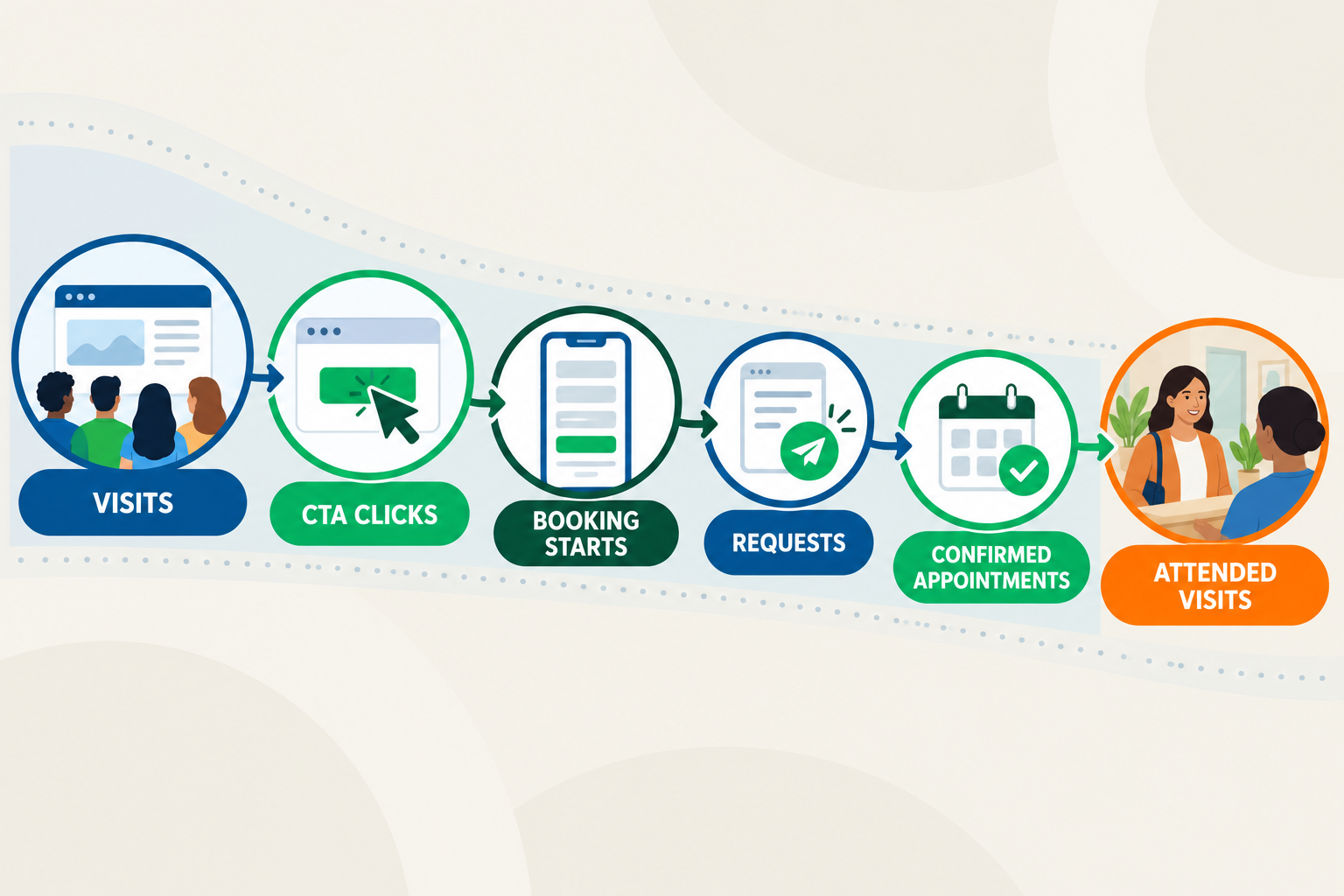
How to calculate your website conversion rate
Use this formula:
Conversion rate = completed conversion actions ÷ eligible website visits × 100
Calculate the rate separately for each action you want to measure, such as calls, appointment requests, confirmed appointments, or attended visits. For example, if a service page receives 1,000 visits and produces 40 appointment requests, its appointment-request conversion rate is 4%. Segment your results by page, traffic source, device, service, and location.
Unbounce reports a 5.1% median for healthcare landing pages, but that isn't a universal target for all pages across a clinic website. Different pages serve different purposes, and specialty, urgency, traffic quality, and tracking methods affect the result. Your most useful benchmark is your own conversion rate over time.
To track your conversion rate, connect website activity with scheduled and attended appointments. Google Analytics 4 (GA4), a CRM, or Tailored Suite by Uniquely Tailored Marketing are examples of dashboards that can connect marketing activity to later outcomes.
Follow the Patient's Path to Booking
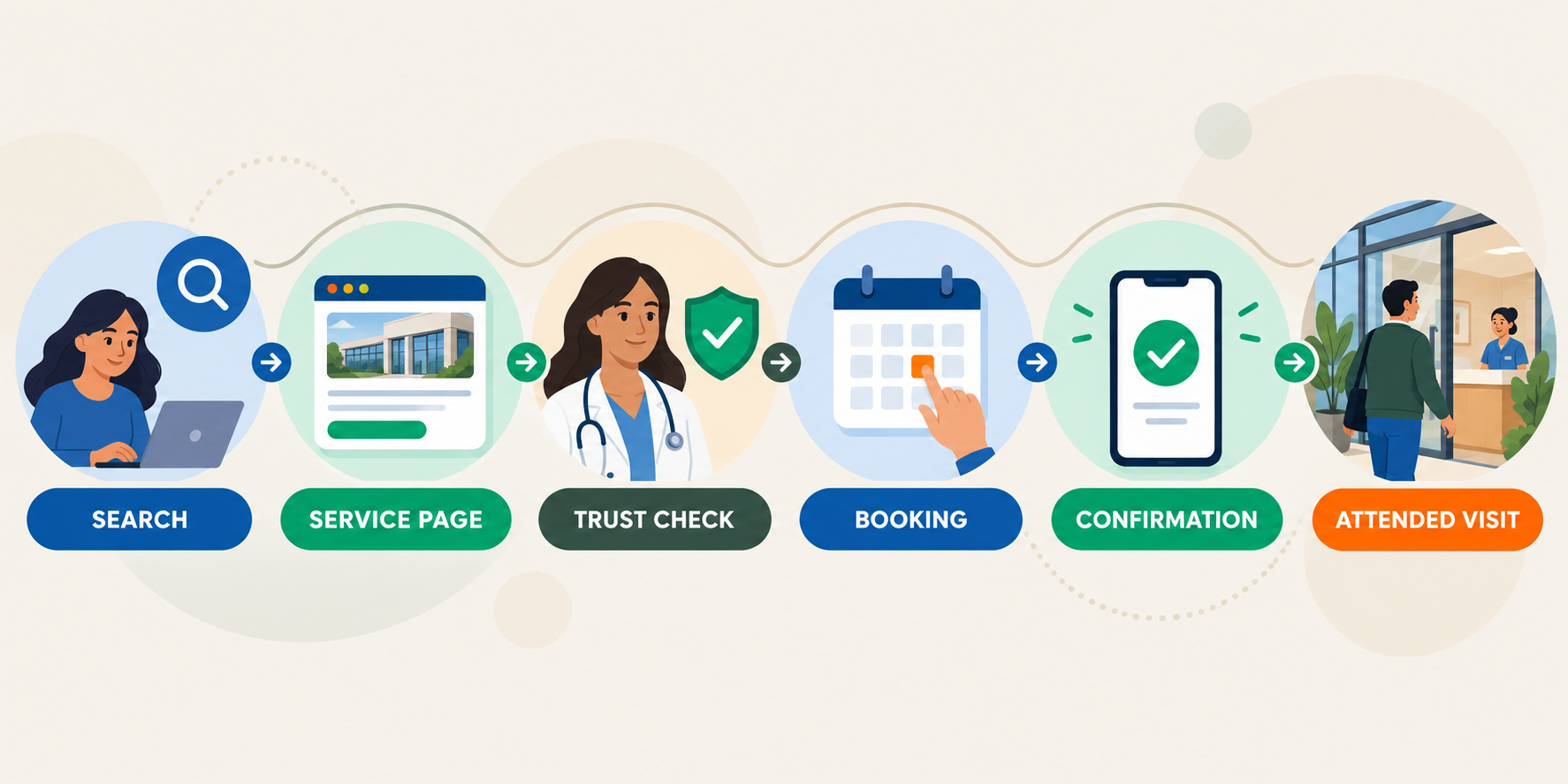
Understanding how prospects actually use your website is a game changer in healthcare website optimization. This can help you identify and fill gaps in your appointment funnel and how users book on your website. A prospective patient experiences a series of questions:
- Does this clinic provide the care I need?
- Is this provider qualified and trustworthy?
- Do they accept my insurance or explain payment options?
- Is the clinic convenient for me?
- What happens if I request an appointment?
To increase online appointment scheduling, follow one priority service from the search result through the service page, form or scheduler, and confirmation on both a phone and a desktop.
Look for broken expectations. For example, Book Now shouldn't lead to a general form followed by a two-day wait. Use Request an Appointment when staff must confirm the time. Save Book an Appointment for real availability.
Review the staff handoff too. If no one receives a notification or inquiries sit unanswered, the website isn't the only conversion problem. Using marketing automation tools like Tailored Suite can help automate actions such as internal notifications for appointment requests.
Give Every Page One Clear Next Step
More choices aren't always helpful. A treatment page that gives equal attention to booking, subscribing, downloading, following, and reading makes the main action harder to identify. Call-to-action best practices are having clear, descriptive button text.
Choose one primary call to action based on the page's purpose:
- Service page: Request an Appointment
- Provider page: View Available Times
- Insurance page: Check Coverage Options
- Location page: Call This Location
Use button copy that explains what happens next. Avoid Submit or Click Here. Place the main CTA near the top and repeat it after key decision-making information.
Messaging Before: “Ready to feel better? Contact us today.” Button: Submit
Messaging After: “Request a physical therapy evaluation. Our team will contact you within one business day to confirm your visit.” Button: Request My Evaluation
A med spa may allow patients to book consultations instantly, while a behavioral health practice may need staff to verify availability, insurance, and provider fit before confirming an appointment. The revised version reduces uncertainty and sets an honest expectation for what comes next.
Make Appointment Forms Easier to Complete
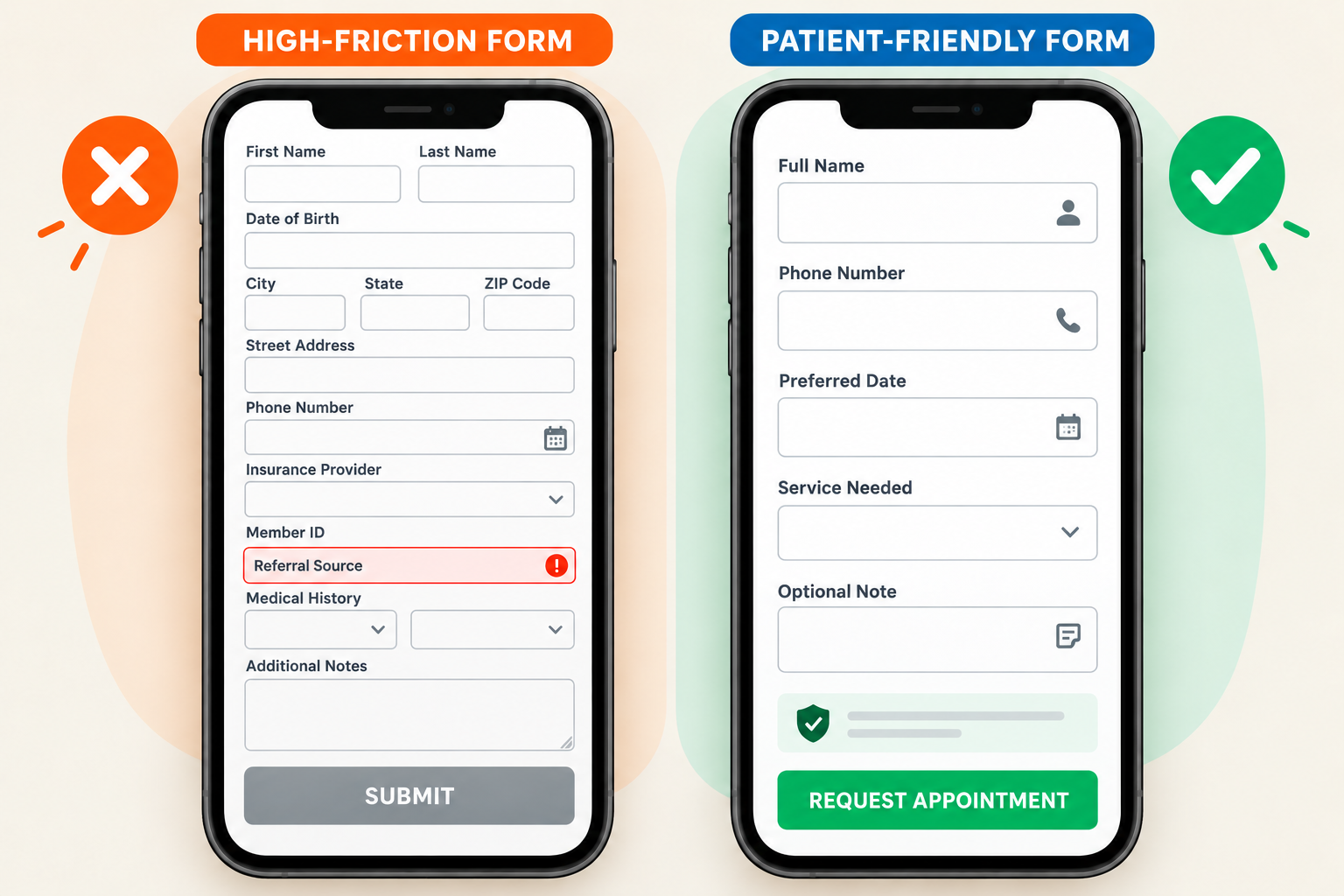
Optimizing the lead capture form is often the best place to start when improving patient booking conversions. An appointment-request form shouldn't double as a complete patient intake packet.
For the first request, collect only what staff needs to respond and route the inquiry:
- Name
- Phone number or email
- Preferred contact method
- Service or appointment type
- Preferred day or time range
Move medical history, insurance identification numbers, and detailed symptoms into the approved intake process when possible. Explain sensitive fields and review the form's privacy and security.
The W3C recommends asking only for information required to complete the process because irrelevant or excessive questions make users more likely to abandon a form. Best practices also include clear labels, helpful instructions, proper validation, and error messages that explain how to fix the problem. Preserve completed fields after an error and use mobile-friendly input settings.
To determine new ways to optimize your lead capture for clinics, track form starts, errors, abandonment, and completions. A shorter form isn't automatically better. A form that routes patients correctly is more valuable than one that produces unusable inquiries, even if it’s shorter.
Put Trust Signals Where Patients Make Decisions
Trust signals for healthcare sites are most effective when they answer a question at the exact point where a patient may hesitate.
Place provider credentials near the service, show insurance or self-pay details before booking, and use reviews that follow applicable rules. Make the address, hours, phone number, accessibility details, and response time easy to find.
Avoid a wall of unrelated badges. Put service reviews on matching pages, credentials near the provider, and privacy context beside the form.
Trust starts before the visit. Keep listings and reviews accurate through local SEO and reputation management, then carry that information onto corresponding pages.
Remove Friction From Mobile Booking
Mobile access is becoming part of the normal patient experience. Federal Health IT data shows that 57% of people who accessed their online medical records in 2024 used an app, compared with 38% in 2020. Clinic forms, portals, and scheduling tools must work comfortably on smaller screens.
To understand your current page speed and mobile optimization, complete a form on your website with one hand on a phone using a normal cellular connection. The most important metrics you should pay attention to for mobile optimization are called your Core Web Vitals:
- Large Contentful Paint (LCP): This tells you your website's loading time. To provide a positive user experience (UX), your page should load within 2.5 seconds.
- Interaction to Next Paint (INP): This measures how quickly a page responds throughout a visit, including when someone taps a menu, selects an appointment, or interacts with a form. A good user experience has an INP of 200 milliseconds or less.
- Cumulative Layout Shift (CLS): This measures the layout shifts that occur on a page or during a user's time on your site. This is the visual stability of your website. Pages should maintain a CLS of 0.1 or less to provide a good user experience.
Mobile visitors should be able to read without zooming, tap buttons easily, call the office, move backward without losing information, and recover from errors. Pop-ups shouldn't cover the booking button.
A fast website still won't convert well if the appointment names are confusing or the calendar reaches a dead end. Page speed and booking usability must work together.
Offer Online Scheduling Without Removing Human Help
Online scheduling gives patients another way to act when the clinic is closed, but it shouldn’t replace phone support. A 2024 Mayo Clinic study found that seven self-scheduling processes produced 733,651 successfully self-scheduled and completed visits in one year. This included 54,367 new-patient visits scheduled through the clinic’s public website. However, a 2025 survey of 3,661 U.S. adults found that 72.1% had scheduled an appointment by phone during the previous year, compared with 34.1% who used a provider’s online portal. Clinics should offer convenient digital scheduling while maintaining an easy way to call for help.
To optimize your appointment funnel, the scheduler should show accurate availability, use plain appointment names, explain eligibility, and provide help when a patient's needs don't fit the choices.
When appropriate, offer three routes:
- Book Online for straightforward appointments
- Request an Appointment when staff review is required
- Call the Clinic for complex scheduling or urgent questions
Confirm immediately whether the appointment is booked or awaiting staff approval via email and SMS through automated workflows.
Match the Page to Why the Visitor Clicked
Each landing page should match the messaging in the search result, ad, email, or social post that brought the visitor there. Not only does that improve the user experience, but it can also strengthen the website’s organic search visibility.
Someone searching for “primary care physician in Houston” shouldn't land on a general clinic homepage. Send that visitor to a relevant provider page with applicable providers, location details, insurance guidance, and the correct appointment action.
Landing page content for each page should address the problem your target audience is trying to solve without creating a thin, sales-heavy page. For example, answer the questions that would delay action for users: Who is this service for? What happens at the first visit? Is a referral required? What should the patient bring?
If a high-traffic page still isn't producing qualified actions, review its content and structure through website design and ongoing optimization.
Measure the Appointments That Actually Happen
Finally, you cannot improve your website performance if you are not properly tracking important metrics to establish a baseline, and track improvements over time. Website reporting should show more than clicks and form submissions. For a fuller picture of performance, track:
- Service-page visits and primary CTA clicks
- Form or scheduler starts, abandons, errors, and completions
- Qualified appointment requests
- Confirmed appointments
- Attended appointments
- Results by source, device, service, and location
Review performance monthly, but address broken forms and notification failures as soon as they appear. The data can help you locate the source of the problem. Strong traffic with few CTA clicks may indicate weak messaging, placement, or page structure. Frequent form abandonment may point to unnecessary questions or technical problems. Completed forms that don’t become confirmed appointments may reveal issues with response time, routing, or follow-up.
To test which optimizations are moving the needle, change one important element at a time and define success first. Compare qualified bookings, not clicks. Low-traffic clinics can combine analytics, error data, staff feedback, and usability sessions.
Use This 30-Minute Clinic Website Conversion Audit
Evaluate your website and booking process using this audit to identify conversion gaps and determine which problems need attention first. Score each item from 0 to 2: 0 means missing or broken, 1 means present but needs improvement, and 2 means clear and working well.
17 to 20 points: The basics are strong. Focus on testing and small refinements.
11 to 16 points: Several barriers may be costing the clinic appointments. Fix the lowest-scoring items first.
0 to 10 points: The website and booking process need immediate attention before adding more traffic.
Turn More Website Visits Into Appointments
The clearest answer to how to increase website conversions is to remove uncertainty. Give every page a purpose, make the CTA clear, keep the first form focused, place trust signals near the decision, and simplify mobile scheduling.
Fast staff follow-up, clear confirmations, connected reporting, and accurate scheduling also affect whether an inquiry becomes an attended appointment.
Start with the highest-traffic service page producing weak appointment results. Complete the audit and fix the lowest-scoring area first. For a full site review, run a free website audit with Uniquely Tailored Marketing.
Frequently Asked Questions
What is a good website conversion rate for a clinic?
There isn't one universal target. Unbounce reports a 5.1% median for healthcare landing pages, but page types differ. Track calls, forms, bookings, and attended appointments separately.
How can I increase online appointment bookings?
Use a clear CTA, accurate availability, plain appointment names, booking alternatives, clear confirmation, and prompt staff follow-up.
Which CTAs work best on clinic websites?
Call-to-action best practices include using descriptive CTAs that explain what happens next, such as Request an Appointment, View Available Times, or Call the Clinic.
How long should a clinic appointment form be?
As a practical starting point, keep the initial appointment-request form to about five visible fields. A 2026 form-conversion benchmark analysis found a notable decline in completion rates when forms increased from five to seven fields. However, there isn’t one perfect number for every clinic. Ask only for the information staff needs to respond and route the request, such as the patient’s name, contact information, service needed, and preferred appointment time. Move medical history, insurance identification numbers, and detailed intake questions to the approved patient intake process.
How often should a clinic test conversion changes?
Run each test long enough to collect a reliable number of conversions and cover at least one complete business cycle. High-traffic clinics may reach a useful result within weeks. Low-traffic clinics may need to combine analytics with form-abandonment data, usability reviews, and staff feedback.